
If you are using HTTP cache, this means that all traffic that goes on port 80 is redirected through the cache engine provided by Extreme (HTTPS on port 443 is not redirected).
If you need to Filter some HTTP website you can do it following these steps:
1) Login in your HTTP admin panel:
http://x.x.x.x:3000
2) Open Filter Control TAB
By default your Filtering System is stopped. You need to Activate it.
3) Download our Default ACL and open it with text editor:
4) Add Desired Websites in your currently downloaded ACL.
File format:
* one URL per line
* only fully formated URLs are accepted. Example format: http://www.somehost.com/directory/file?parameter=value.
* hash (#) symbol is considered as comment. Be careful with URLs containing that symbol. For more information see bellow.
* empty lines are ignored
Please note the most common problems are described in this file. Read them carefully!
5) Save your file and Upload it in your system:
!NB: If you DID NOT follow our File format you will noticed errors with wrong lines.
Your ALC will be NOT uploaded and accepted.
You need to edit the wrong lines, save it and upload it again.
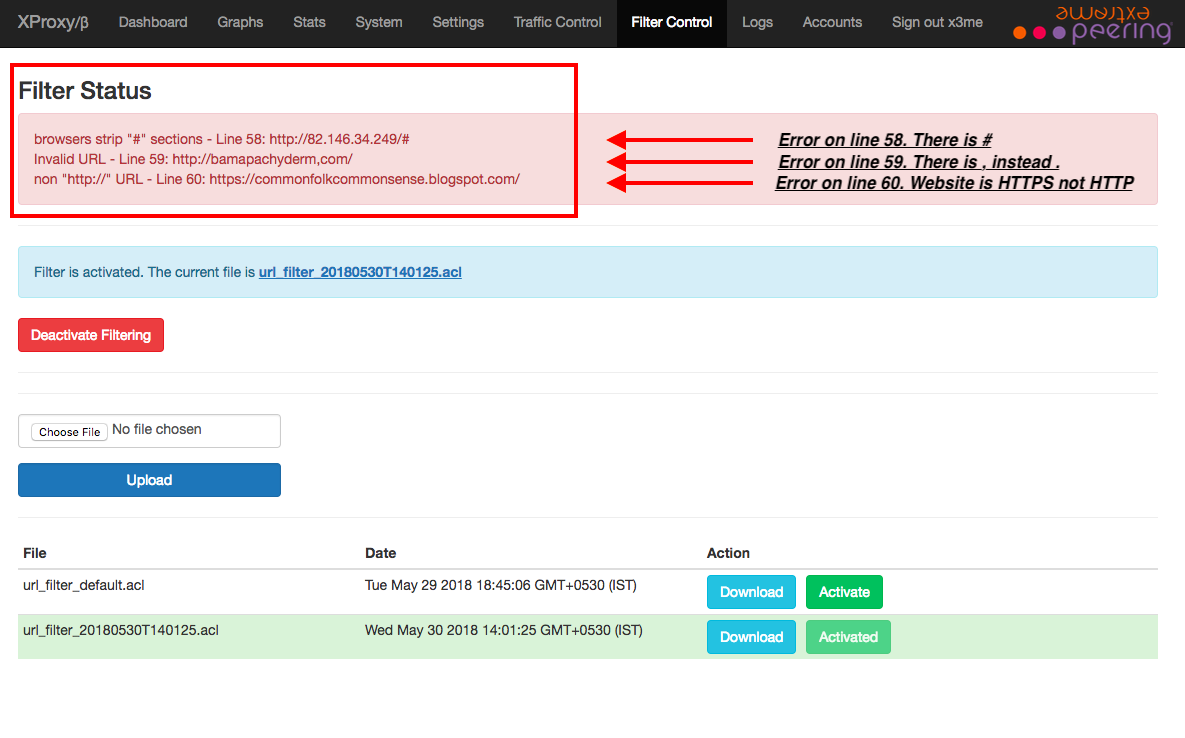
Your ALC will be NOT uploaded and accepted.
You need to edit the wrong lines, save it and upload it again.
6) You can Activate some old ACLs anytime.
Select some Already uploaded ACL and Click on Activate button:
Select some Already uploaded ACL and Click on Activate button:
7) To Stop / Deactivate Filtering you must Click on Deactivate Filtering button:
8) To Activate Filtering Again you must select some ACL and Click on Activate button or Upload new ACL.
0 Comments